
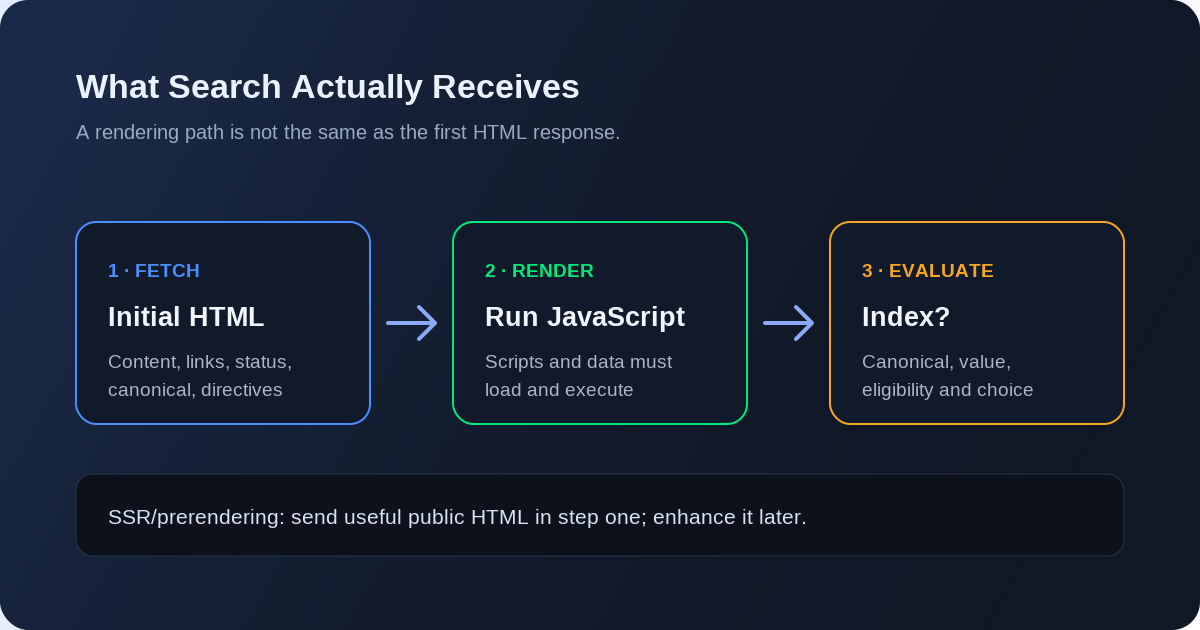
A React page can look complete in your browser while its first HTML response contains almost nothing but a root element and script tags. That does not automatically make the page invisible to Google. It does mean Google has another step to complete before it can evaluate the content, and every additional step is a dependency worth understanding.
Google Search can render JavaScript. Its documented process separates crawling, rendering, and indexing, and those stages need not happen at the same moment. Other crawlers, social previews, internal tools, and some users may not run your application JavaScript at all. The practical goal is not “never use JavaScript.” It is to return a useful, crawlable page and make enhancement reliable.
What does “JavaScript-rendered HTML” mean?
A browser first downloads HTML, then may download JavaScript that changes the page. In a client-rendered app, the initial response might contain a title and an empty <div id="root">. React later fills that root with headings, text, images, and links. Server-side rendering (SSR) or prerendering sends that useful page markup in the initial response instead.
Imagine a product page whose browser view shows a title, price, availability, description, and links. Use curl or View Source to inspect the response before JavaScript runs. If the meaningful content is absent there but appears in DevTools after the app starts, the site is relying on client-side rendering for that content.
That difference matters because “what I see in the browser” and “what a crawler receives first” are different observations. Browser DevTools’ Elements panel shows the live, modified DOM. The Network panel’s document response or View Source shows the original response. When diagnosing search visibility, inspect both.
The phrase “rendered HTML” can also describe the final DOM after JavaScript. Google documents a crawl, render, and index process for JavaScript pages. A crawler may need to fetch the page, queue it for rendering, execute scripts, and then evaluate the resulting content. That is supported, but it is not the same as content being immediately present in the response.
Does Google index a page without server-side rendering?
It can, but client-only rendering adds a dependency on successful JavaScript fetching and execution. Google says it renders JavaScript, while also recommending server-side or prerendering as a useful option for users and crawlers. Other bots may not execute scripts. Do not treat “Google can run JavaScript” as evidence that every crawler will see your page.
The actual risk depends on what the page needs JavaScript to do. If the initial HTML contains the main content, a script can progressively add filters or interactions. If it contains only an app shell, the crawler must execute the app before it can see the article or product information.
Rendering can fail or become incomplete when required scripts are blocked, return errors, rely on unavailable APIs, or wait on a client-side request that does not finish. A consent overlay, authentication requirement, or broken API can also leave the page with little useful content. A long rendering queue is not a guarantee of failure, but it makes the initial response a less dependable place to hide the page’s purpose.
Consider a store category page that renders product names only after calling an API. A human browser may show the products a moment later. A crawler that cannot complete that request might see an empty category. Returning core product names and crawlable product links in the initial HTML reduces that dependency; JavaScript can still handle filters and sorting.
See Google’s JavaScript SEO basics and guidance for fixing JavaScript search problems for the documented process and practical checks.
How do you test the HTML Google and other bots receive?
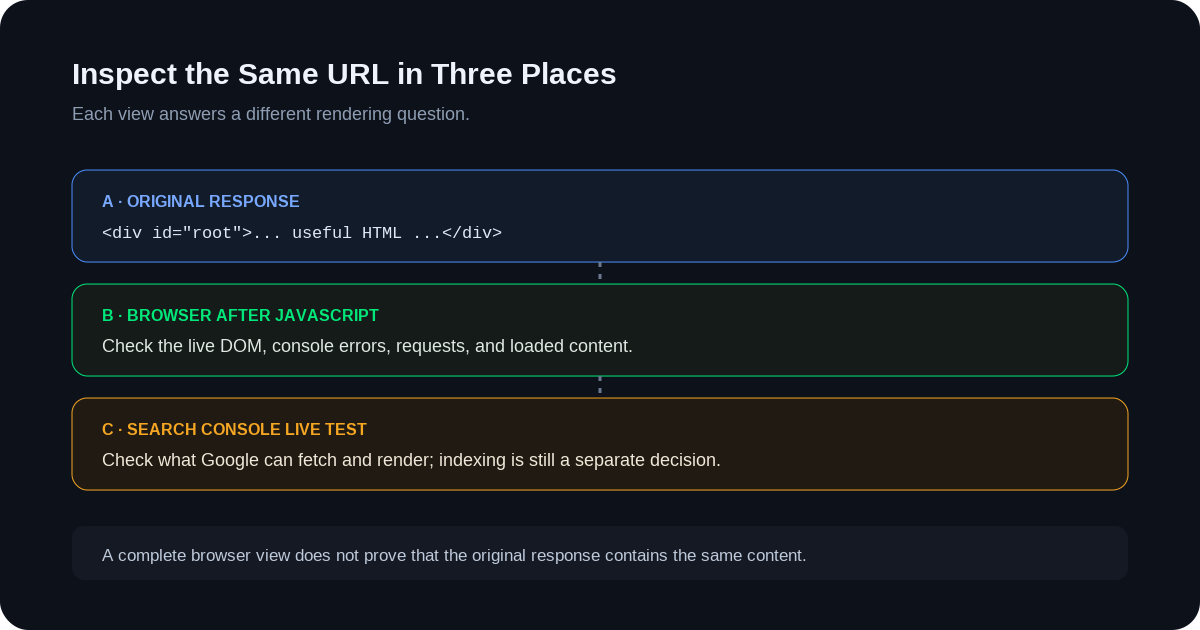
Compare the original HTTP response with the browser’s rendered page, then test the URL with Search Console. This identifies whether content is missing before JavaScript, whether scripts or APIs fail, and whether Google can access the rendered result. Each check answers a different question; none by itself guarantees indexing.
- Fetch the URL without a browser. Check the status code, canonical link, robots directives, title, main heading, and whether the important content is present.
- Open the URL in a clean browser session. Check the Console and Network panels for failed scripts, blocked requests, errors, and content that never loads.
- In Search Console’s URL Inspection tool, inspect the indexed version and run a live test. Review the rendered screenshot and page resources where available.
- Compare canonical declarations, internal links, and the visible content with the intended canonical page.
- Fix the underlying issue, publish the change, and request a recrawl only when useful. Recheck later rather than repeatedly submitting the same URL.
For the first check, a command such as curl -L https://example.com/category/widget can retrieve the response. Do not conclude that a page is indexable just because the response is 200: status, page content, robots directives, canonicalization, and overall usefulness all matter.
| Observation | What it suggests | Next check |
|---|---|---|
| Main text appears in the first response | The page is not hiding that text behind client rendering | Verify canonical, robots directives, links, and Search Console status |
| The root is empty until scripts run | The page depends on client rendering | Check script access, API requests, and the live rendered result |
| Browser and rendered test both show a blank block | The page may have an app or data error | Check network requests, logs, and route-specific data |
| Text appears but links are not ordinary anchors | Discovery may depend on interaction handlers | Use crawlable <a href="…"> links for destinations |
When should you choose SSR, prerendering, or client rendering?
Choose rendering per route and its data needs, not as a framework badge. SSR creates HTML for a request; prerendering produces HTML ahead of time for pages whose content can be built in advance; client rendering builds the view in the browser. Hybrid applications can use more than one approach.
| Approach | Good fit | Main trade-off |
|---|---|---|
| Prerendered HTML | Articles, service pages, stable landing pages | Content changes may require a rebuild or regeneration |
| Server-side rendering | Request-specific pages or frequently changing public data | Adds server execution, caching, and operational concerns |
| Client-side rendering | Authenticated tools and highly interactive application views | Crawlers and first-time visitors depend more on JavaScript |
| Hybrid rendering | Sites mixing editorial pages, catalogs, and app screens | Requires clear route-level data and cache rules |
An article with stable copy rarely needs to wait for the browser to assemble its paragraphs. A private dashboard often does, because its content depends on the signed-in user. A product catalog may use server HTML for names and links, then enhance the experience with client-side sorting. The right choice follows the visitor’s needs and the information that must be discoverable.
SSR is not automatically faster in every deployment. It can increase server work, create caching challenges, and introduce data-fetching failures. Conversely, client rendering is not automatically bad for search. Evaluate the actual initial response, application behavior, accessibility, and support requirements before choosing.
What does hydration change, and what does it not change?
Hydration attaches React behavior to HTML that already exists; it does not replace the need to send useful HTML. The server and the client’s first render must agree closely enough for React to hydrate reliably. A mismatch can produce warnings and unexpected behavior, but a successful hydration does not prove the page is indexed.
If the server sends an article title and body, a reader can begin reading before React attaches its event handlers. Hydration makes the interactive controls work. If the server sends only an empty app root, hydration cannot make the original response useful before JavaScript runs.
Keep the first render deterministic. Avoid using browser-only values such as viewport width, current time, or local storage to produce a different tree on the client’s first render. Pass shared data to both environments where possible. When a value genuinely exists only in the browser, read it after hydration if the experience permits. Our React hydration mismatch checklist explains how to diagnose those differences.
How should you fix a page that depends too much on JavaScript?
Start with the page’s content and route, then make the smallest rendering change that returns the missing information reliably. Do not rebuild the whole site before verifying that JavaScript is the cause. Start with one representative route and test its production output.
- Identify the page elements that are missing from the original response: article text, product links, title, metadata, or navigation.
- Check if the content comes from a browser API, a blocked endpoint, a delayed request, or a route that fails during production builds.
- Move essential public content into SSR or prerendered output where appropriate. Keep private or highly interactive data behind its intended authorization boundary.
- Make navigation use regular links with real destinations. JavaScript may improve transitions, but crawlers should not need to click a button to discover a page.
- Confirm the final response and live rendered test after deployment.
Do not expose private data to make a page appear crawlable. The objective is useful public HTML for public pages, not removing authentication from private routes. If the page is intentionally private, set its access rules and indexing behavior deliberately instead.
Why can a page still be absent after rendering works?
Rendering is one stage, not an indexing promise. Google may crawl and render a page but decide not to index it. A correct HTML response cannot fix a noindex directive, a conflicting canonical, a duplicate or unhelpful page, poor discovery, or a server that intermittently fails.
After confirming the rendered content, inspect URL Inspection for the selected canonical and the reported index status. Review robots meta and HTTP headers, the HTTP status, duplicate variants, internal links, and whether the page contributes something distinct. If a page was crawled but not selected, repeating the same request for indexing is not a diagnosis. Our guide to recovering a crawled-but-not-indexed URL gives a separate investigation workflow.
Frequently asked questions
Does Google need server-side rendering to index React?
No. Google can render JavaScript, but SSR or prerendering can make public content and links available sooner and to more crawlers. Check the actual response before deciding.
Will SSR make my page rank?
No. SSR can address how content is delivered. Ranking depends on many factors, and rendering alone does not guarantee indexing or visibility.
Is an empty root element always a problem?
Not necessarily. It is a signal that the first response may depend on JavaScript. Test whether the main content and links become available reliably in Google’s rendered inspection.
Should every page use the same rendering strategy?
No. Public articles, live product pages, and private dashboards have different freshness, privacy, and interaction needs. A hybrid approach is often appropriate.
What should I inspect first if a page is blank in search?
Compare the raw response and Search Console live test, then check failed scripts and APIs, access restrictions, robots directives, canonical URL, and server status.
Does prerendering mean my content never changes?
No. It means HTML is prepared ahead of the request. You must still decide how often to rebuild or regenerate it when content changes.