
Product filters make a catalog easier to use, but query parameters can create many URL variants: color, size, price range, sorting, and pagination. Some variants may show substantially the same content; others may represent a useful, distinct landing page. Applying one blanket canonical rule without understanding the URL space can create new problems.
Inventory what the site actually generates
Collect examples from category navigation, filter controls, analytics, server logs, and Search Console. Group URLs by what changes: sorting order, a temporary filter, a product attribute, a page number, or tracking parameters. Record whether each URL returns a useful page, a duplicate, an empty result, or an error.
Create a small URL matrix before changing settings. For each representative URL, record its purpose, whether it returns a page worth showing in search, the canonical it currently emits, and whether the sitemap or internal navigation links to it. Include combinations of filters, not only individual filters: two filters together can produce an empty page or duplicate another category. This inventory reveals whether one rule will affect many different URL types.
Decide which variants deserve a URL
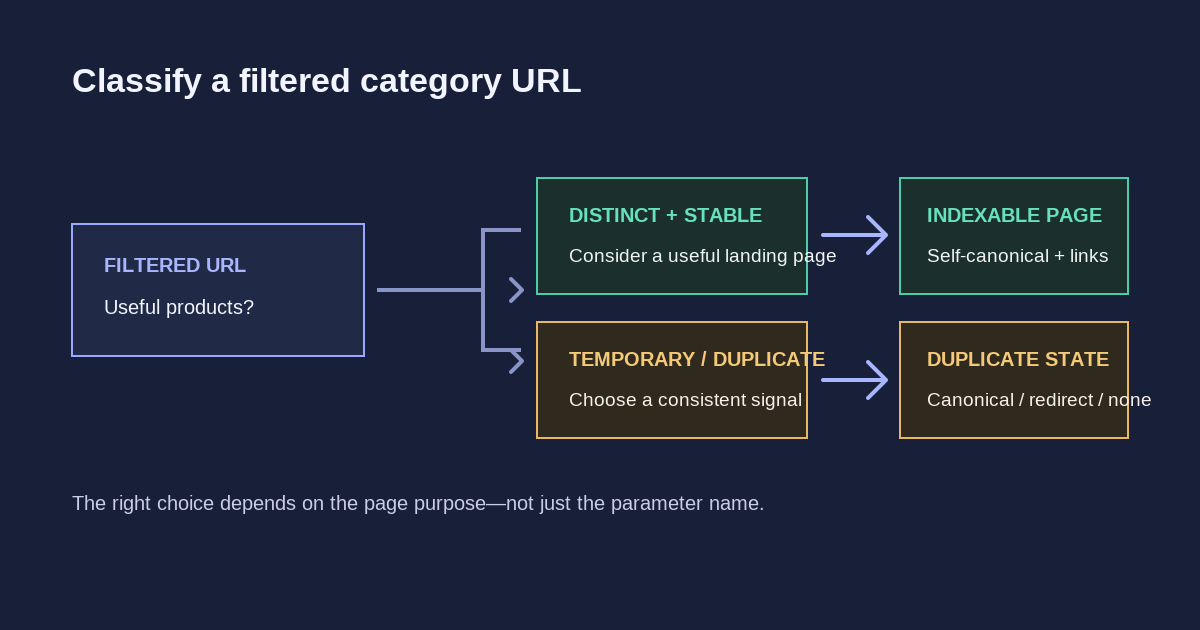
A filter combination can be valuable when it satisfies a distinct search or shopping need and has a stable set of products. A transient combination with no unique purpose may be better treated as a user-interface state rather than a search landing page. Decisions depend on inventory, demand, and how reliably the page can be maintained; there is no universal parameter blacklist.
Use a small inventory matrix to make the decision explicit:
| URL type | Does it change the useful product set? | Typical question |
|---|---|---|
| Sort order | Usually changes sequence, not intent | Should visitors and crawlers see a separate destination? |
| Tracking parameter | No; it measures a visit | Does the canonical remove the tracking value? |
| Single attribute filter | Sometimes | Is this combination useful and stable enough to curate? |
| Multiple filters | Often creates many combinations | Does this exact page remain useful and non-empty? |
| Pagination | Shows another segment of a collection | Do page links and canonical signals match the navigation? |
Treat these as prompts for inspection, not universal SEO rules. A store may intentionally build a curated landing page around one attribute, while another store may have volatile stock that makes the same URL empty next week. Record the page purpose, product set, canonical, indexability, and internal links for a few examples before changing a site-wide rule.
Make canonical signals consistent
For genuinely duplicate or near-duplicate pages, select the preferred URL and make internal links, redirects where appropriate, sitemap entries, and canonical annotations consistent with that choice. Google may choose a different canonical because canonical annotations are hints, not absolute commands.
Do not block duplicate URLs in robots.txt as a substitute for canonicalization: Google may need to crawl the page to see its canonical. Also avoid pointing every filtered URL to the category root if the filtered content is meaningfully different and should remain discoverable.
Keep the distinction between a canonical and a redirect clear. A redirect removes the alternate destination for users as well as crawlers, so use it when the alternate URL should no longer be served. A canonical leaves the page accessible while indicating a preferred equivalent. Neither approach repairs conflicting internal links on its own; update site navigation and product links so they favor the intended destination.
Keep tracking parameters out of the canonical
Campaign parameters generally should not create separate canonical destinations. Ensure the canonical points to the clean page URL, while analytics can still read the incoming campaign parameters. Verify the final rendered canonical in page source and with URL inspection rather than assuming a plugin setting produced the intended markup.
Also confirm that the canonical target is crawlable and returns the expected status. A canonical pointing to a redirect, a noindex page, or an unrelated category sends conflicting signals. If filters update the visible product list without changing the URL, decide whether that state needs a stable shareable URL; if not, avoid generating crawlable parameter combinations that all represent the same state. If a filter is intentionally a landing page, give it stable content and links rather than relying on a temporary client-only selection.
Test representative combinations
For example, a curated “waterproof hiking boots” category may deserve a stable URL if it has useful content, inventory, and internal links. A temporary sort order such as “price low to high” is usually a presentation choice rather than a separate search landing page. Decide from the page’s user and search purpose, not simply from a parameter name.
- Choose a normal category, a sort URL, a single filter, and a multi-filter combination.
- Check response code, canonical, indexability, internal links, and product content.
- Confirm pagination and empty-filter states behave intentionally.
- Review Search Console’s duplicate and canonical reports after changes.
Google’s canonicalization overview explains how duplicate URLs are consolidated, and its guide to specifying a canonical URL covers supported signals. Use those rules as a framework, then make decisions based on the store’s real catalog and search goals.
Before release, check that the page's canonical points to an accessible URL that returns the intended content. Verify that internal links and sitemap entries favor the URL you want discovered. Avoid using a canonical as a substitute for repairing a broken filter, and do not redirect an alternate route if shoppers still need that filter state to work. If the category template itself is slow, first identify its LCP bottleneck with the WooCommerce storefront performance guide; indexing and loading performance are separate diagnostics.
Document a small representative test set: the clean category URL, one sort order, one attribute filter, a combined filter, and a paginated URL. For each, test the filter interaction, browser back button, direct reload, canonical, response, and empty-result behavior. Then inspect internal links generated by the theme and extensions; a canonical preference cannot compensate for navigation that continually points users and crawlers at unintended variants.
Re-run the sample after theme or filter-plugin updates, since a control can change its URL format without changing the visible product list. Check URL encoding, parameter order, duplicate parameters, and whether selected filters survive reload. Search Console examples and server logs can help identify which variants are being crawled, but use a privacy-safe sample and avoid exporting customer-specific query values unnecessarily.
If the store deliberately supports a search landing page for a filtered set, treat that route as a maintained page: confirm that products remain available, its title and descriptive content explain the selection, and category navigation links to the stable URL. If the set becomes empty, decide whether to show a useful empty state, redirect, or remove it from navigation based on the user purpose. Avoid sending all empty combinations to a generic category without checking whether the redirect makes sense for shoppers.
After changing a canonical or redirect rule, test both the browser experience and the crawler-facing response. A redirect should lead directly to the intended destination, while a canonical should appear on the accessible page itself. Validate internal links, the sitemap, and pagination as well as the tag; mixed signals are harder to diagnose than one isolated configuration value.
If Search Console reports that a filtered URL was crawled but not indexed, investigate its canonical choice and distinct value with the crawled-but-not-indexed diagnosis guide before changing every filter rule.
Keep the decision aligned with the catalog team's operating reality. A curated attribute page is only useful if someone can maintain its product availability, navigation, and description as the assortment changes. If there is no stable intent behind a combination, treating every possible query string as a permanent landing page creates work without necessarily helping shoppers. If a filter is important to customers but not appropriate for search, it can still remain available as an interface state without being treated as a separate editorial destination.
When many filters exist, look for combinations rather than just counting unique URLs. A color and size selection may return a useful set individually, but together produce no products. Test empty and one-result states, ensure browser history restores the selected filters, and confirm that canonical logic does not send shoppers to a page showing a different set. This makes the decision useful for both search systems and people navigating the catalog.
Filter URL questions
Should every filtered URL canonicalize to the category root?
No. A stable, useful filtered page can serve a distinct purpose. Evaluate the content and inventory behind it before consolidating it with the broader category.
Should sorting parameters be indexable?
Usually sorting changes presentation rather than the products' search intent, but verify your own URL behavior and signals. Make sure internal links do not create a large set of equivalent destinations unintentionally.
Can robots.txt replace a canonical?
No. Blocking crawling can prevent a crawler from seeing the canonical annotation. Use the appropriate supported signal for the specific URL purpose and keep it consistent with internal linking and redirects.
Is a canonical a directive Google must obey?
No. Google treats canonicalization signals as hints and may select another representative URL. Keep duplicate pages, redirects, internal links, and sitemap entries consistent with the intended destination.