
A published page is not necessarily indexed, and a URL can be crawlable without being selected for indexing. Before changing SEO plugin settings or rewriting content, identify what Google reports for the exact URL and check the page as it is delivered to crawlers.
Inspect the exact URL in Search Console
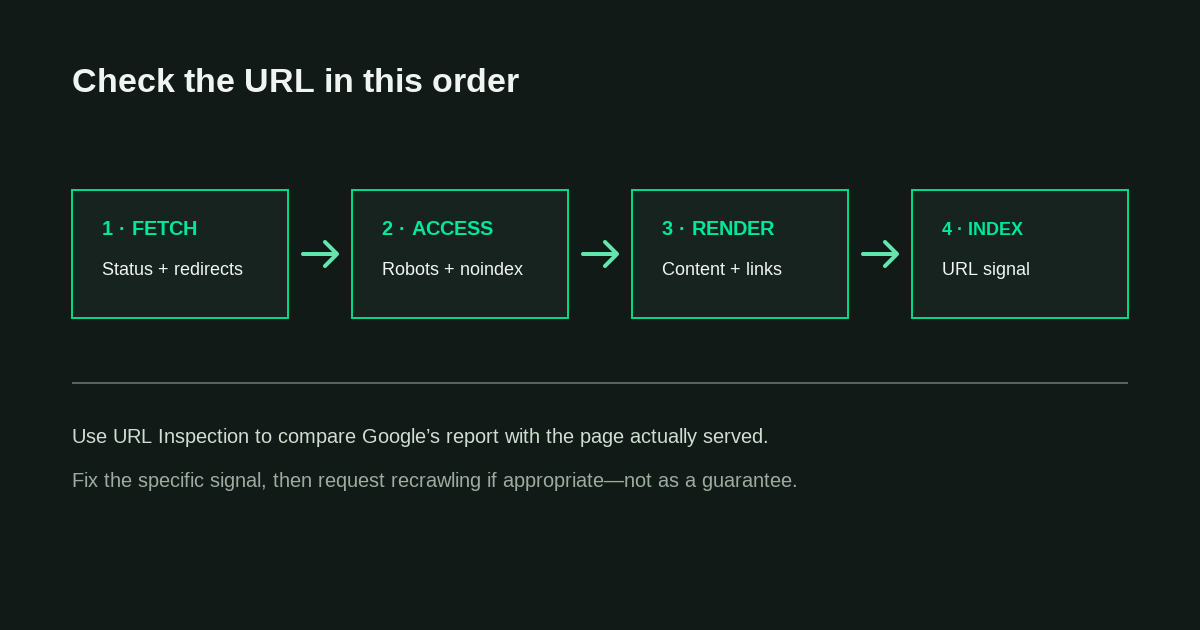
Use URL Inspection for the canonical URL you expect Google to index. Review the reported indexing state, last crawl, user-declared canonical, and Google-selected canonical where available. A status message narrows the investigation; it does not replace checking the live page and its response.
Check whether indexing is explicitly discouraged
Inspect the page’s HTML for a noindex robots meta directive and check the HTTP X-Robots-Tag response header. SEO plugins may set these at page, post-type, archive, or site level. Review the effective directive, not only a checkbox in the editor.
Do not use robots.txt to try to remove a URL from the index: if crawling is blocked, Google may be unable to see the page’s noindex directive. Confirm intended crawl access and indexing separately.
Confirm the page is accessible and understandable
Check the response status, redirects, and whether the final URL serves the expected content to an unauthenticated visitor. Google’s rendering may rely on JavaScript, CSS, and other resources; blocked assets can interfere with understanding a page. Use the live test and inspect the rendered output for the primary content and links.
Check for soft errors as well as server errors. A URL can return a successful status while displaying an empty template, an access challenge, or a “not found” message in the body. Confirm that the important text is present in the rendered page and that the page does not require a user interaction or session that a crawler cannot perform. If JavaScript loads the main content, use the rendered test to verify that the content appears without a console error.
Test a representative affected URL in a logged-out browser as well as Search Console. Follow the redirects to the final destination and record the response status, canonical element, robots meta tag, and any X-Robots-Tag response header. View the rendered page and check whether primary text and normal links appear. A WordPress page may look fine in the editor while a caching, security, or SEO plugin changes what anonymous visitors receive.
Do not assume every SEO plugin setting describes the final response. A page-level noindex can be combined with a post-type default, a server header, or a template-generated canonical. Inspect the delivered page and headers. If the URL is meant to be indexable, check for conflicting directives and remove only the one that is unintended; if it is intentionally private, do not remove the protection just to satisfy a report.
Review canonical and internal-link signals
Make sure the canonical points to the intended version and that internal links consistently use that URL. Check for accidental duplicates caused by trailing slashes, parameters, or alternate hostnames. A canonical annotation is a signal, not an instruction Google must follow, so consistency across redirects, sitemaps, and internal links matters.
Inspect the page’s robots directives in the actual response, not only the WordPress editor. A plugin, theme template, or server configuration can add a header that overrides what the page-level setting suggests. If the page is a duplicate, decide whether to consolidate it with a canonical or redirect; if it is intentionally excluded, make sure the exclusion is deliberate and scoped to the right URL.
Use a diagnosis-first fix
Also check whether the URL is reachable through useful internal links. A sitemap can assist discovery, but it does not guarantee that Google will select a page for indexing. If the URL matters to visitors, link to it from a relevant category or related article and confirm that the link resolves directly to the canonical destination.
For a product, category, or translated page, compare more than the title. Does this URL serve a meaningfully different purpose from another accessible page? If two URLs share substantially the same content, consolidate signals consistently. If the page is distinct and useful, make sure its main content, links, and canonical describe that version. Avoid creating a batch of nearly identical “location” pages with only a city name swapped; that may add little value for either visitors or search systems.
In Search Console, compare the user-declared canonical with the Google-selected canonical when both are available. If Google selected a different URL, inspect that destination and compare redirects, content, internal links, and sitemap inclusion. Do not immediately change every canonical setting: first establish which page should represent the content and whether the selected destination is actually wrong for users.
If the page is blocked by authentication, a firewall challenge, or a server rule, resolve that access issue before rewriting the copy. If it is accessible but its rendered body is empty, debug the template, API, and JavaScript errors. If access and rendering work but Google selects another canonical, compare the duplicate pages and their signals. If the URL is canonical and eligible but remains excluded, review whether it adds enough distinct value for the intended query and whether relevant pages link to it. Each diagnosis points to a different owner and remedy.
WordPress sites can produce several URL forms for one piece of content: preview links, query parameters, category archives, feeds, and trailing-slash variants. Use the public canonical route in internal links, then verify redirect and canonical behavior at that exact URL. Do not expose private previews or staging copies to crawlers while resolving a production indexing problem. If the site was recently migrated, check the old-to-new redirect map and ensure the new destination serves a complete page rather than a redirect chain or soft 404.
Keep a before-and-after record with the inspected URL, date, reported status, response checks, canonical, and the single change made. Search Console data can lag a deployment; inspect the live response immediately and revisit the report later. A recrawl request is optional and cannot force an indexing decision. If the status changes, compare the new evidence with the old record instead of assuming the most recent edit caused the result.
- Capture the URL Inspection result and fetch the live URL.
- Check response status, robots directives, canonical, and rendered resources.
- Compare the page with intended internal links and sitemap entries.
- Fix the specific issue, then request recrawling if appropriate.
- Recheck later; indexing is not instantaneous and cannot be guaranteed.
For authoritative details, see Google’s SEO Starter Guide, its Search Console guide, and the robots meta tag documentation.
Do not treat every “not indexed” status as the same problem. First distinguish access (could the crawler fetch the URL?), rendering (did the fetched page expose its important content?), canonical selection (which equivalent URL did Google select?), and indexing (did Google decide to include the page?). The next action depends on which step has evidence of a problem. A recrawl request may prompt another look, but does not guarantee inclusion or a particular time frame.
For a more specific “crawled but not indexed” diagnosis, use the step-by-step recovery guide. If the page depends on client-side scripts, compare its response and rendered output with the JavaScript rendering guide. On WordPress, inspect the effective page robots tag and HTTP headers, since plugin and server settings can differ.
It helps to keep a small inspection record per affected URL rather than changing several global settings at once:
| Check | Evidence to record | What it helps distinguish |
|---|---|---|
| Fetch | Response status and final URL | Access errors, redirects, and soft 404 behavior |
| Directives | Robots meta and response headers | Intentional exclusion versus a conflicting setting |
| Render | Main text, resources, and links | Missing content or client-side failures |
| Canonical | Declared and selected URL | Duplicate variants and consolidation |
| Discovery | Internal links and sitemap entry | Whether the intended page is reachable |
This is a debugging aid, not a scoring system. One failed check can explain the exclusion, while several conflicting signals may need to be resolved together. Save the date and the tested route so a later URL Inspection result can be compared with the actual changes made. For a useful page, retain a direct internal link from a relevant category or guide instead of relying on a sitemap alone.
WordPress indexing questions
Does publishing a page or adding it to a sitemap guarantee indexing?
No. A sitemap can help discovery, but Google decides whether and how to index a URL. Make sure the page is accessible, useful, internally linked, and consistent with the site's canonical signals.
Can robots.txt remove a noindex page from search?
Blocking a URL from crawling can prevent Google from seeing its noindex directive. If the goal is to exclude an accessible page from search, verify the page or HTTP header directive while allowing crawling as needed.
What should I inspect if Search Console says the URL is indexed?
Compare the user-declared and Google-selected canonical and confirm that the inspected URL is the one you intended. A different canonical can explain why an alternate URL does not appear separately.
Should I request indexing after every edit?
Use recrawl requests selectively after correcting a meaningful issue. They are not a substitute for making the page accessible and useful, and they do not guarantee an indexing decision.