
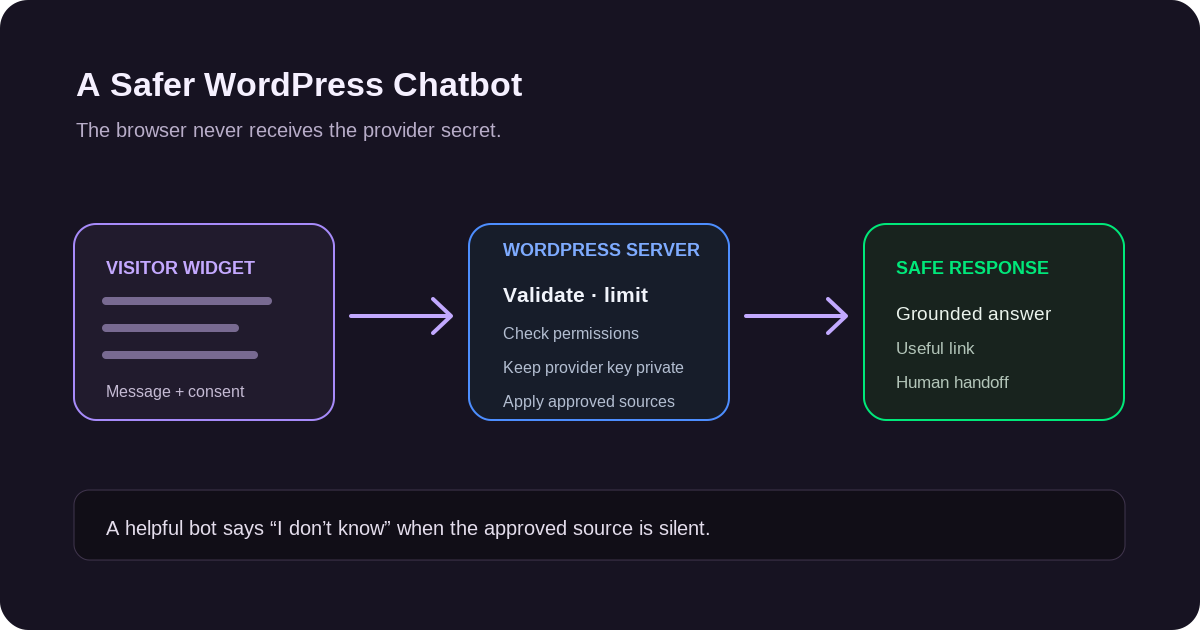
A chatbot on a WordPress site can answer common questions, route visitors to the right service, or collect a request for a human follow-up. It can also confidently give an incorrect answer, expose private data, or send an API key to every browser if the integration is rushed.
Start with the job, not the model. If visitors mostly need opening hours and a contact form, a well-organized FAQ may be clearer and cheaper to maintain. If they need help finding products or understanding policies, a chatbot can provide another interface to approved information. The integration should make a real task easier and offer a clear way to reach a person.
Should you use a hosted chat widget or build your own?
Choose a hosted widget for a quick, vendor-supported launch; choose a custom integration when you need control over data, behavior, or the site experience. Neither is universally better. Compare the actual service terms, moderation, integrations, accessibility, data handling, and total operating work.
| Option | Useful when | Trade-off to check |
|---|---|---|
| FAQ and contact form | Questions are predictable and low-volume | Visitors may need to search several pages |
| Hosted chat widget | You need a quick install and vendor dashboard | Vendor control, script performance, data terms, ongoing plan |
| Custom WordPress endpoint | You need custom rules or controlled data access | You own security, uptime, costs, and maintenance |
| Human live chat | Questions need judgment or account context | Requires staffing and clear availability |
For a small site, a hosted widget can reduce implementation effort. Read its privacy terms, identify where conversations are stored, and test keyboard access and mobile behavior. For a custom build, count the work after launch too: prompt updates, content review, provider changes, abuse protection, and support.
Do not add a chatbot because competitors have one. Define the visitor question it answers, which information it can use, which requests it must refuse or hand off, and how you will recognize success. A useful fallback can be better than an impressive demo.
What should the WordPress chatbot architecture look like?
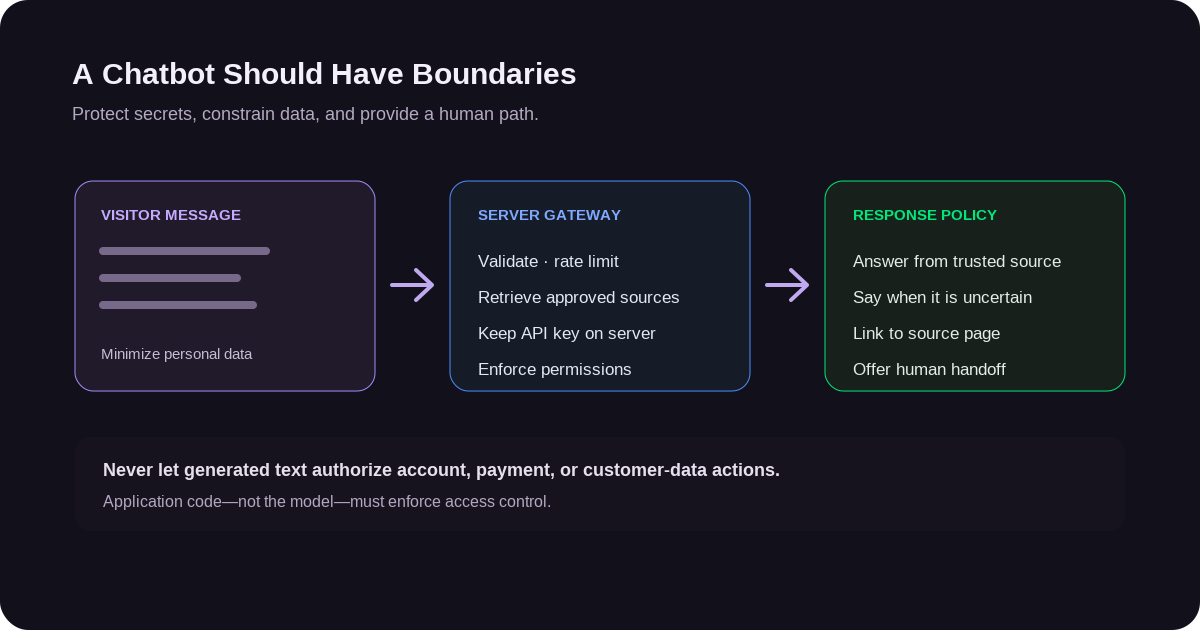
Keep the provider key and decision logic on the server; let the browser send a limited message to a protected endpoint. A browser-side widget should not call a paid AI API using a secret embedded in JavaScript. Anyone can inspect a public bundle or network request.
A typical architecture looks like this:
- The visitor opens the widget and sends a message.
- The browser sends a small JSON payload to your WordPress REST route.
- The route validates message length, request origin where appropriate, and rate limits.
- The server checks the approved knowledge sources and calls the provider using a server-side secret.
- The server returns a constrained answer, suggested links, or a handoff status.
- The interface shows the answer and a human contact option.
For example, the browser payload might be { "message": "How do I return an order?" }. It should not include the API key, hidden admin data, or more customer information than needed. The response can include an answer and a short list of allowed URLs instead of arbitrary HTML.
WordPress custom REST routes should define their methods, input validation, and a deliberate permission_callback. A public visitor-facing chatbot may permit unauthenticated messages, but that does not mean it should permit arbitrary privileged actions. See the WordPress REST API handbook for endpoint concepts. For the browser-to-server request pattern, see AJAX in WordPress.
If you use an external automation tool rather than a custom route, apply the same separation: secrets stay in the server-side connector, the public form accepts only needed fields, and failures are visible to the site owner.
How should the chatbot answer from your actual content?
Restrict it to a defined source of truth and make uncertainty visible. A chatbot should not invent refund terms, availability, pricing, or project promises that the business has not published.
Start with a small knowledge set: service descriptions, shipping and return policies, frequently asked questions, and public documentation. Remove outdated pages. Give each source an owner and review date. If the system retrieves passages from documents, test whether it can find the right passage when wording differs from the document heading.
Use clear rules:
- Answer only from approved information for business-specific claims.
- Say when the answer is not available rather than guessing.
- Link to the source page when a visitor needs detail.
- Hand off account, payment, legal, medical, or unusually complex questions.
- Do not expose internal notes, credentials, unpublished offers, or another customer’s information.
A hypothetical example: a visitor asks whether a particular WooCommerce product can ship to Lahore. If stock and delivery rules are not connected to the bot, it should not guess. It can link to the shipping policy or ask the visitor to contact support. If live inventory is connected, the server should fetch the product’s current state from an authorized source and explain when that data was checked.
The bot’s tone is less important than its boundaries. A concise, honest “I can’t confirm that—here is the current policy and a way to contact us” is safer than a polished fabricated answer.
What privacy and security checks matter before launch?
Treat a chat transcript as user-provided data that may contain sensitive information. Tell visitors what is collected and why, minimize retention, and do not send unnecessary personal details to third-party services.
Before launch, document:
- Which information the widget collects and whether the visitor is told before sending it.
- Which service processes messages and in which regions or under what retention terms.
- Whether transcripts are used to improve or train provider models, and what account settings control that.
- How users can request help or avoid submitting sensitive details.
- How long logs are retained and who can access them.
- How the site responds to a provider outage, abuse, or a data request.
Protect the endpoint against automated abuse. Apply per-IP or per-session limits where appropriate, cap message size, use timeouts, validate content types, and avoid unlimited retries. Do not rely on a frontend-only limit because a visitor can call the endpoint directly.
For authenticated features, check the user’s capability on the server for every action. Never let a chatbot’s text output decide whether a user is authorized. The model can help interpret intent; application code must enforce permissions.
Check the provider’s current documentation and terms before launch. API model names, pricing, data controls, and rate limits change. Do not publish a price or retention promise without verifying the account and region that will actually be used.
How do you integrate the chatbot into the WordPress interface?
Add the smallest accessible interface first, then test it on real page templates and devices. A visually attractive floating button is not enough if it covers a checkout control, traps keyboard users, or shifts the page.
The widget should have a labeled open/close button, a clear heading, keyboard navigation, visible focus, readable contrast, and an understandable loading state. Keep the conversation within the viewport on mobile. Avoid opening automatically on every page before a visitor has context.
For a custom widget, the front end can call a same-origin WordPress endpoint using fetch(). Handle the request as asynchronous work: show loading, display a clear response, and present a recoverable error when the server or provider fails. Our WordPress AJAX and REST API guide shows the request pattern.
For slow workflows—such as syncing a conversation summary to a CRM—return the visitor response first and queue the background task. Do not hold the chat bubble open indefinitely while the CRM responds. The WP-Cron and automation guide explains scheduling and retry considerations. For tasks that need precise delivery timing, use an appropriate queue or external scheduler rather than assuming WP-Cron runs exactly on the minute.
How do you test whether the bot is actually helping?
Test answer quality, failure handling, accessibility, and the human handoff—not just whether the API returns text. Prepare a repeatable set of questions before launch.
Include questions the source answers, questions it does not answer, misspellings, multiple topics in one message, requests for private data, and attempts to override the bot’s rules. Confirm the response links to the correct page, refuses unsupported claims, and routes complex cases to a human.
Track a small set of operational measures: widget opens, completed conversations, unanswered topics, handoffs, errors, response time, and whether visitors complete the intended task. Avoid treating conversation volume as success. Review transcripts with appropriate access and retention controls, and remove personal details from analytics wherever possible.
Test the provider timeout and rate-limit response. Confirm that a retry does not charge the visitor or create duplicate CRM records. Disable the external service in staging and check that the site’s main navigation, checkout, and contact path continue working.
Frequently asked questions
Can I put my AI API key in a WordPress shortcode?
Do not expose a secret in rendered HTML or browser JavaScript. Store it server-side and call the provider from a protected server endpoint.
Can a chatbot use WordPress pages as its knowledge base?
Yes, if the integration can retrieve and process those pages. Keep the sources current, restrict access to intended public content, and test whether answers cite the right material.
Does a chatbot replace a contact form?
Not necessarily. Keep a form or direct contact path for visitors who prefer it and for cases the bot cannot resolve.
What should a chatbot do when it is unsure?
Say it cannot confirm the answer, link to an authoritative page, or offer a human handoff. Do not reward a system for producing confident guesses.
Can a public chatbot endpoint be abused?
Yes. Validate input, limit message size and request rates, apply provider spending limits where available, and monitor unusual traffic.
Should conversations be stored forever for analytics?
No default retention period suits every business. Store only what is needed, set a review period, restrict access, and meet applicable privacy obligations.