
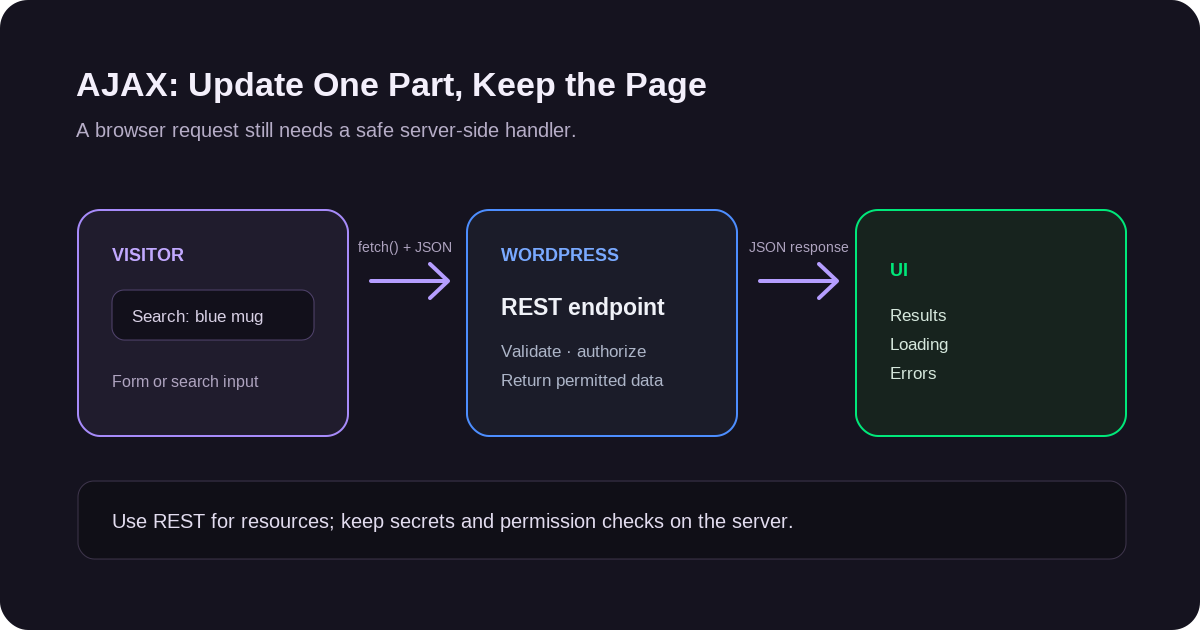
You type “blue mug” into a product search, and matching products appear without the whole page reloading. That interaction is a familiar example of AJAX: the browser sends a request in the background, receives data, and updates part of the page.
AJAX is not a special WordPress plugin or a security feature. It describes an asynchronous browser-to-server request pattern. The data can be JSON, not just XML. In a modern WordPress project, the REST API is often the clearest way to expose structured data. WordPress also supports the older admin-ajax.php mechanism for plugin actions.
What does AJAX mean, and what happens during a request?
AJAX means Asynchronous JavaScript and XML, but modern AJAX requests commonly exchange JSON. JavaScript sends an HTTP request while the page stays open. The server responds with data, and the browser changes the relevant part of the interface.
The sequence is straightforward:
- A visitor enters a search term.
- JavaScript sends the term to a server endpoint.
- WordPress checks the request and returns matching data.
- The browser renders results or a useful error message.
The page itself does not have to be reloaded. That makes it useful for search suggestions, cart updates, form validation, and dashboards. It does not mean the server is bypassed. The request still needs to be authorized, validated, and handled reliably.
For example, a directory page could send a search term to a public endpoint and replace only the result list. A checkout payment request is different: it involves sensitive state and requires careful server-side validation. The same asynchronous pattern does not make those two tasks equally safe.
How can you make a real WordPress search request?
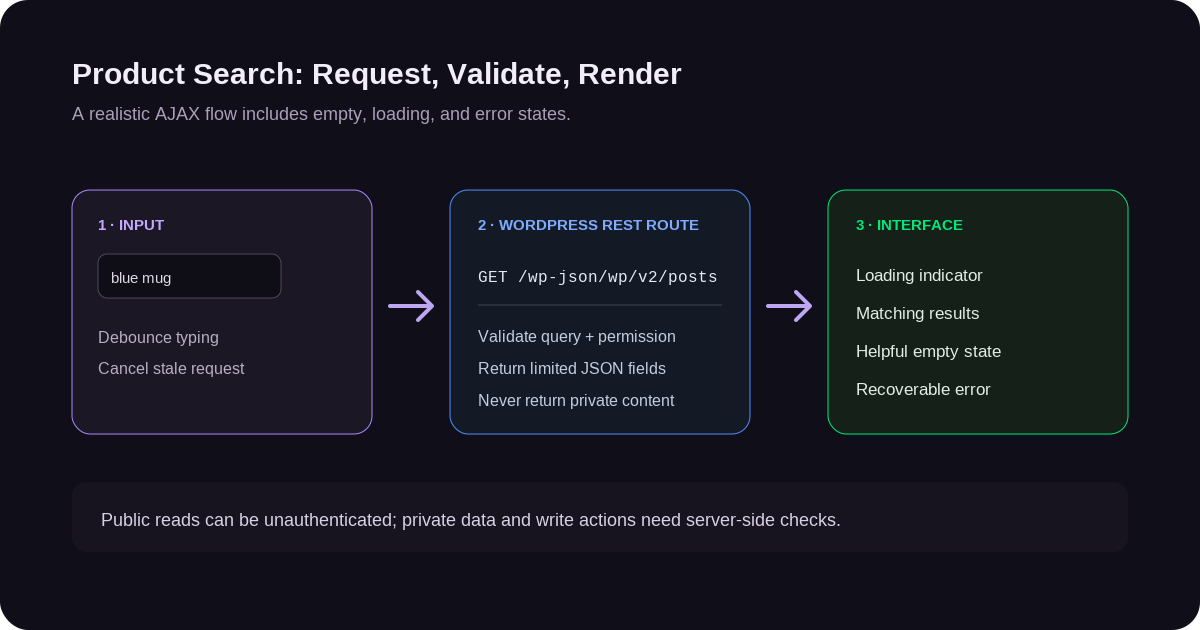
For public content, the built-in WordPress REST API can return matching posts as JSON. The browser can use fetch() to request the public posts endpoint with a search term. Keep the example limited to public content; private data and write operations need appropriate authorization.
This request searches published posts and asks for up to five results:
const searchPosts = async (term, signal) => {
  const url = new URL("/wp-json/wp/v2/posts", window.location.origin);
  url.searchParams.set("search", term);
  url.searchParams.set("per_page", "5");

  const response = await fetch(url, { signal });
  if (!response.ok) {
    throw new Error(`Search failed with status ${response.status}`);
  }

  return response.json();
};
The endpoint is on the same WordPress site in this example. A separate frontend domain may need a properly configured API URL and cross-origin policy. Do not hard-code a development host into production code.
Here is a small UI pattern that handles loading, empty, and error states:
const controller = new AbortController();

try {
  setStatus("loading");
  const posts = await searchPosts(searchTerm, controller.signal);
  setResults(posts);
  setStatus(posts.length ? "ready" : "empty");
} catch (error) {
  if (error.name !== "AbortError") {
    setStatus("error");
  }
}
In a real component, abort the previous request when the query changes or the component unmounts. Otherwise a slow response for an older query can arrive after a newer one and overwrite the correct results. Debounce frequent keystrokes so one character does not create a burst of requests.
The REST response contains objects, not trusted HTML. Render titles and excerpts as text, and build links from validated URLs. Avoid inserting API responses using innerHTML. The WordPress REST API handbook explains that the API returns JSON and respects WordPress access restrictions.
When should you use the REST API instead of admin-ajax.php?
Use the REST API when you need a structured resource endpoint; use admin-ajax.php when an existing plugin or legacy action is built around WordPress AJAX hooks. Neither option is automatically secure. Choose based on the shape of the task and the project’s conventions.
| Question | REST API | admin-ajax.php |
|---|---|---|
| Main shape | Resources and JSON endpoints | Named action hooks |
| Public content retrieval | Natural fit for core content routes | Possible, but often unnecessary |
| Existing plugin integration | Depends on its registered routes | Common in established plugins |
| Permission model | Route permission callback and authentication | Action registration plus your own checks |
| New custom interface | Often easier to document and extend | Can be appropriate for small legacy actions |
WordPress itself recommends considering the REST API for structured data access, and its AJAX plugin documentation explains the admin-ajax.php request flow. If an established plugin exposes a stable AJAX action, you do not need to rewrite it solely because REST sounds newer.
An endpoint should have a clear contract: accepted input, response fields, errors, permissions, and rate expectations. That makes the interface easier to test and safer to change.
What security checks does an AJAX endpoint need?
Treat every request as untrusted, even when it comes from your own page. Validate and sanitize inputs, enforce permissions on the server, and escape data when displaying it. A nonce helps protect WordPress actions from certain cross-site request forgery scenarios, but a nonce is not authentication or authorization.
For a custom write endpoint, decide:
- Who may call it? Check the current user’s capability or another appropriate identity.
- What input is valid? Validate types, allowed values, length, and expected format.
- What data can be returned? Return only fields the caller is permitted to see.
- Can the action be repeated? Make repeated submissions safe where practical.
- Is the request sensitive? Protect credentials and personal data, and follow the site’s privacy and retention requirements.
For REST API routes, define a permission_callback; do not register a write route with an unconditional public permission callback just to make a frontend example work. Public read endpoints may be intentional, but they should expose only genuinely public information.
Avoid placing API secrets in browser JavaScript. Any secret shipped to the browser can be inspected. For third-party services, route the request through a server endpoint that checks permissions, validates input, applies rate limits, and keeps provider credentials on the server.
Why do AJAX search results go missing or show stale data?
Most failures come from an incorrect URL, a rejected request, a response shape mismatch, or overlapping requests. Inspect the browser Network panel first, then compare the request and response with the UI’s expectations.
- Confirm the request URL, query parameters, and HTTP method.
- Check the response status and body in the Network panel.
- Verify the endpoint’s permissions and authentication requirements.
- Confirm the code handles an empty array and non-success responses.
- Cancel or ignore old requests when the search term changes.
- Test logged-out and logged-in behavior separately.
If the request works as an administrator but not as a visitor, the endpoint may require authentication or the data may not be public. Do not “fix” it by exposing private content. If the request returns 200 but the interface is empty, inspect the response fields; the API might return title.rendered, while the code expects title.
Also test network failure, slow responses, and repeated submissions. A polished interface tells the visitor whether it is loading, empty, failed, or successful. Quietly showing nothing is not a good error strategy.
How does AJAX fit into an automation or chatbot integration?
AJAX is the browser-facing part of an integration; the server still owns credentials, validation, and external side effects. A chatbot may send a message asynchronously to a server endpoint, which calls an AI provider, checks the result, and returns a response. A form workflow may send a lead to a CRM without a full page reload.
The browser should send only the information needed for the request. The server should authenticate the visitor where relevant, validate the payload, enforce limits, call approved services, and return a structured response. Log failures without storing unnecessary sensitive content.
For recurring or delayed work, a request-response interaction alone is not enough. If sending an email or syncing a CRM can take a while, queue the job and return a tracking status instead of making the browser wait indefinitely. Our WordPress automation and cron guide explains when scheduled work belongs in WP-Cron. For a full conversational example, see the WordPress chatbot integration guide.
Frequently asked questions
Is AJAX still used in modern websites?
Yes. The name remains common for asynchronous HTTP requests made by JavaScript. Modern applications often use fetch() and JSON rather than XML.
Does AJAX require jQuery?
No. Browser APIs such as fetch() can make the request. WordPress also supports jQuery, and some existing plugins depend on it.
Is the WordPress REST API public?
Some endpoints expose public content. Protected content and write operations require appropriate authentication and permissions. Check the route rather than assuming every endpoint has the same access.
Does a nonce secure a public AJAX endpoint?
A nonce is not a substitute for checking permissions, validating input, limiting abuse, or protecting secrets. Use each control for its intended purpose.
Why do I see an admin-ajax.php error?
Check the action parameter, registered hook, request method, nonce if used, permissions, and PHP/server logs. The Network response often reveals whether the request failed or returned an unexpected payload.
Should an AJAX search replace normal page navigation?
Not always. Keep a usable no-JavaScript or direct-link path when the content should be discoverable and navigable. AJAX should enhance a working experience rather than hide every route behind a click handler.