
A shopper can add an item to a WooCommerce cart and still leave before paying. That does not automatically mean the checkout is broken: some people are comparing options or saving a cart for later. The useful question is whether a preventable obstacle is appearing in the journey—and what evidence would confirm it.
Begin with the whole journey
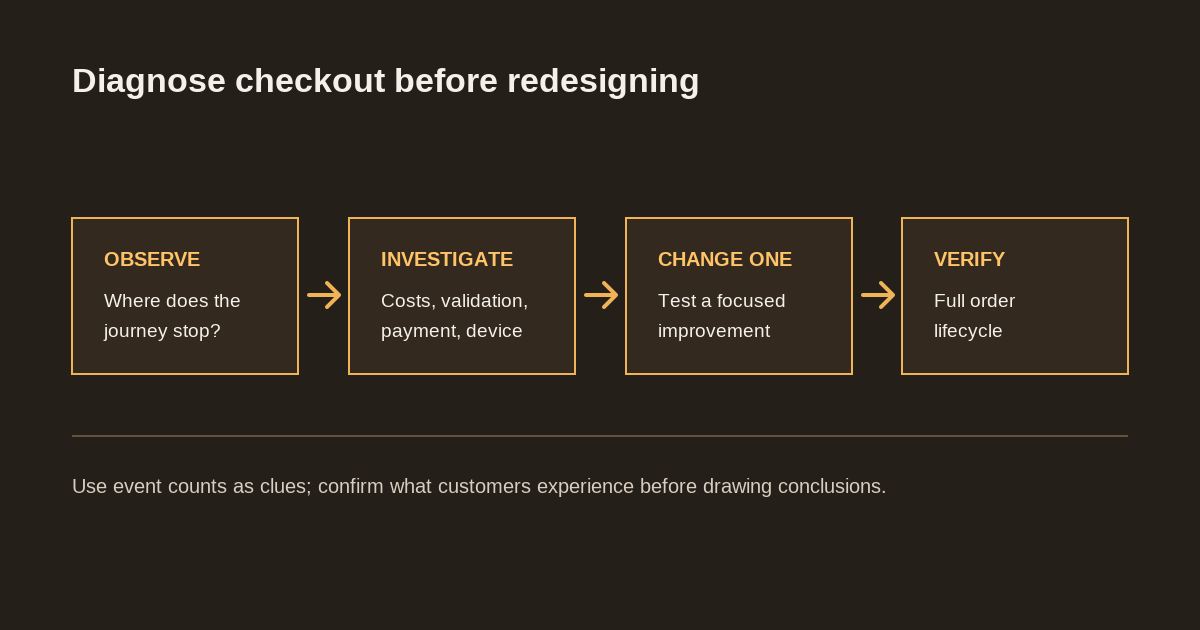
Walk through the store on a phone and desktop, from product selection to order confirmation. Note where shipping, tax, discounts, account creation, payment methods, and delivery estimates become visible. Check for validation messages, disabled buttons, layout shifts, slow responses, and fields that are hard to use with a keyboard or screen reader.
Compare real analytics by step and device, but interpret the data carefully. Tracking can be incomplete, and a drop between steps does not by itself explain why someone left. If possible, combine funnel data with customer support questions, session feedback collected with consent, and usability testing.
Start by checking that your tracking describes the same journey across the site. Decide exactly what counts as a checkout start, payment attempt, and completed order, then compare analytics with the store’s actual order records over the same period. Consent choices, ad blockers, payment redirects, and duplicate event handlers can all affect event counts. A funnel is an investigation aid, not a perfect record of every shopper.
Look for where the friction occurs rather than treating all abandonment as one problem. A shopper who leaves before entering an address has a different experience from someone who receives a payment error. Segment by device, shipping region, and payment method when the sample is large enough. Avoid drawing strong conclusions from a handful of sessions or exposing personal checkout data in analytics.
Make the total cost predictable
Unexpected charges are a common source of frustration. Show shipping rules and likely delivery timing before the final payment step, and make taxes or additional fees understandable. If exact shipping depends on an address, explain that before asking a shopper to complete a long form. Keep discount behavior clear: make it easy to apply a code without encouraging shoppers to leave checkout to search for one.
Ask only for information you need
Review each required field: is it necessary to fulfill the order, calculate delivery, comply with a requirement, or contact the customer? Remove redundant inputs and make optional fields genuinely optional. Offer guest checkout when it fits the business, and describe the benefit before asking someone to create an account.
Use appropriate input types, clear labels, and inline error messages that identify how to fix a problem. Preserve entered information after a validation error. Test autofill and mobile keyboards, since a form that is technically short may still be difficult to complete on a small screen.
Test validation with both valid and invalid inputs. Errors should be associated with the relevant field, written in plain language, and shown without wiping the rest of the form. Ensure the page moves focus or otherwise guides keyboard and screen-reader users to the error summary. Do not require a phone number or company name unless the store has a clear operational reason; every extra field adds work and another opportunity for confusion.
Check the behavior of the form, not just its field count. Can a shopper tell which address is required for delivery versus billing? Does the form preserve valid entries after one field fails? Does the error message explain the correction and remain visible long enough to act on? Test keyboard focus, browser autofill, narrow screens, and a slow connection. A shorter form that loses entered information on error can create more work than a longer form with clear recovery.
Avoid forcing account creation before a visitor can understand the total cost and delivery options. If the store needs an account for a specific service, explain why and when it is needed. Compare guest and account flows with the same test products and regions, and check that promotions or returning-customer information are not creating different totals. A checkout is a sequence of decisions; revealing a required cost or restriction only at the final payment step can make the earlier choices feel misleading.
Check trust and payment behavior
Explain returns, contact options, and delivery expectations in context. Confirm that payment choices work in the relevant regions and that the payment provider returns a clear success or failure state. Never test a live payment with a real customer order; use the provider’s sandbox and documented test cards.
Run both successful and declined payment tests. Check what the shopper sees if the payment provider is temporarily unavailable, a 3-D Secure challenge is cancelled, or the browser returns from an external provider slowly. The order should not be marked paid merely because the visitor reached a confirmation URL; verify the gateway's documented status flow and the store's resulting order state. Keep any gateway secrets out of browser code and support screenshots.
Review the post-payment state too. The confirmation page should make it clear whether the order was received, how to get help, and what happens next. Check that confirmation email, inventory reduction, shipping notification, and analytics events happen as intended and do not duplicate after a refresh. A lower abandonment count is not a success if it was caused by double-counting the same order or hiding a payment failure.
Prioritize with evidence
Choose one friction point, define a measurable outcome, and test a focused change. Avoid redesigning the whole checkout based on a single abandoned order. Baymard’s cart abandonment research summarizes reasons shoppers report for leaving; those findings are useful context, not a guaranteed explanation for any individual store. Your own customer and journey data should guide what to fix first.
Check changes across the full order lifecycle, not just the final button. A checkout adjustment can affect tax calculation, shipping selection, coupon application, fraud checks, payment redirects, and confirmation emails. Use the payment gateway’s test mode and a controlled test order, then verify the order and notifications in the admin. Keep a short release note so staff know what changed and where to report regressions.
Use a short experiment plan before changing the live checkout:
- State the suspected friction and the evidence that points to it.
- Choose one change that could address that friction without altering unrelated steps.
- Pick a primary outcome, such as completed orders, and guardrails such as payment errors or support contacts.
- Decide how you will separate device, region, and payment method when the available sample supports it.
- Test the full journey in staging, then monitor the live change and revert if guardrails worsen.
If traffic is low, a controlled usability test and support-ticket review may give more useful direction than a weak statistical comparison. Do not claim a conversion lift from a handful of orders. For a similar storefront bottleneck outside the checkout flow, see the INP guide to slow interactions.
Write down the expected event sequence before interpreting a funnel: checkout started, address submitted, payment attempted, order confirmed. Compare event counts with order records for the same dates, and note consent or payment redirects that may cause missing or duplicate analytics events. Do not record full addresses, card details, or other sensitive checkout values in analytics. A drop between two steps identifies where to investigate; it does not by itself explain why someone left.
For a focused test, choose one change such as showing shipping information earlier, then define the primary measure and guardrails before launch. Check purchase completion alongside payment errors, refunds, support contacts, and device breakdowns. If checkout includes complex extension or order-storage integrations, verify those on staging using the WooCommerce HPOS compatibility checklist. If shoppers report slow cart controls, the INP troubleshooting guide covers interaction responsiveness separately.
Checkout questions
Does every abandoned cart mean checkout is broken?
No. A shopper may compare products, wait, or decide not to buy. Use repeatable technical evidence and patterns across enough visits before deciding that a particular checkout change is needed.
What is the safest way to test a checkout change?
Use staging or the payment provider's documented test mode, then complete the order lifecycle from cart through confirmation. Verify that stock, taxes, emails, refunds, and connected integrations behave as expected.
Should I remove optional fields?
Review whether each field is genuinely needed for fulfillment or a clear business requirement. Test the resulting form on mobile and with keyboard navigation; do not remove information a business must collect to complete the order.
Which checkout metric should I optimize?
Start with the step where reliable data shows a problem, then choose a primary outcome such as successful completed orders. Track guardrails such as payment failures and support issues so a change does not improve one count while harming the actual customer journey.